Brief:
Projects
Projects >> Exhibits Homepage Redesign
Exhibits Homepage Redesign
My Role:
WCAG Accessibility Tester
Context:
History Colorado’s Online Exhibits homepage needed a refresh after the severe inaccessibility of the previous auto-rotating carousel.
Tools:
WAVE, WebAim, VoiceOver, NVDA, manual accessibility testing,
Goals:
-Improve accessibility
-Increase the amount of potential users by including people with visual impairment by addressing screen readers and contrast issues
Problem:
The problem addressed in this website update is the lack of accessibility. Online content that meets accessibility requirements is likely to be more user-friendly for everyone.
Accessibility Audit Findings
WCAG Violations (Critical Priority: Level A/AA Failures)
-
Keyboard Navigation / Operability (2.1.1 & 2.4.1): The "Skip to main content" link was hidden and could not be accessed using keyboard-only navigation.
-
Semantic Structure / Headings (1.3.1): The main "Online Exhibits" text needed to be set as Heading Level 1. Individual exhibit names (e.g., Bent's Fort, Amache, La Gente) needed to be set as Heading Level 2. The "History Colorado's Resources" footer text had incorrect heading code (<h4 role='heading' aria-level='2'>) and needed to be correctly changed to Heading Level 3 (<h3>).
-
ARIA / Code Validity (4.1.2):Two broken ARIA references were found (aria-labelledby="menu-account-title" and aria-labelledby="menu-footer-title") where the target elements did not exist.
-
Redundant Links (2.4.4): The hover state "View Exhibit" on the exhibit images was a redundant link that created additional navigation and repetition for keyboard and screen reader users and was requested for deletion.The image of the History Colorado building at the bottom of the page was redundantly linked to the home page, duplicating the nearby text link "HISTORY COLORADO".
-
Page Title (2.4.2):The title of the page needed to be changed from "Home | History Colorado" to "History Colorado's Online Exhibits Homepage".
-
Alt Text Semantics (1.1.1): The existing Alternative (Alt) Text was redundant, repeating the exhibit title, which caused the screen reader to read the title twice. It was recommended to add better descriptive alt text or mark the image as decorative.
Accessibility Best Practices (High Priority: Enhanced UX/Advisory Techniques)
-
Link Differentiation: The five "View Exhibit" buttons needed to be differentiated by adding the exhibit name (e.g., "View La Gente Exhibit") to provide better context for users.
-
External Link Warning: Links that open in a new window (target="_blank") needed an icon and a label to indicate "open a new window," which required specific W3C coding semantics for screen reader recognition.
-
Link Text Formatting (Readability): The link text "HISTORY COLORADO" used all capital letters, which needed to be changed to "History Colorado," as avoiding all caps is an accessibility best practice for readability.
-
Skip Link Target: The"Skip to Main Content" link was initially anchored to the footer and needed to be changed to anchor to the top of the exhibits section to improve navigation flow.
-
Non-Interactive Element Cues: After the redundant "View Exhibits" hover state was removed, the mouse cursor incorrectly changed to a pointer (hand icon) over the exhibit images. This needed to be corrected so the mouse retained the arrow cursor.
-
Content Clarity: The text link for technical issues was initially imprecise ("For technical issues please email us - email") and later requested to be updated to "email History Colorado's Online Exhibits" for better clarity.
Accessibility Improvements:
Before:

After:

Before:
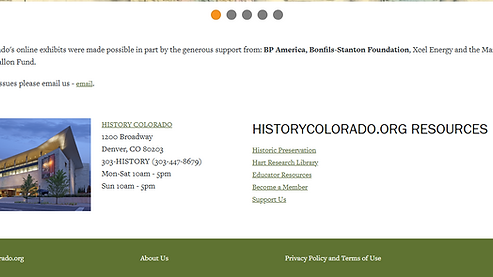
After:

